raylib/ports/core/core_input_mouse_wheel
Licence This example has its own licence, rather than Odin's: raylib/ports/LICENSE
These are ported Raylib examples, and as such, they are subject to Raylib's license.
Copyright (c) 2013-2024 Ramon Santamaria (@raysan5)
The rest of the licence
This software is provided "as-is", without any express or implied warranty. In no event
will the authors be held liable for any damages arising from the use of this software.
Permission is granted to anyone to use this software for any purpose, including commercial
applications, and to alter it and redistribute it freely, subject to the following restrictions:
1. The origin of this software must not be misrepresented; you must not claim that you
wrote the original software. If you use this software in a product, an acknowledgment
in the product documentation would be appreciated but is not required.
2. Altered source versions must be plainly marked as such, and must not be misrepresented
as being the original software.
3. This notice may not be removed or altered from any source distribution.
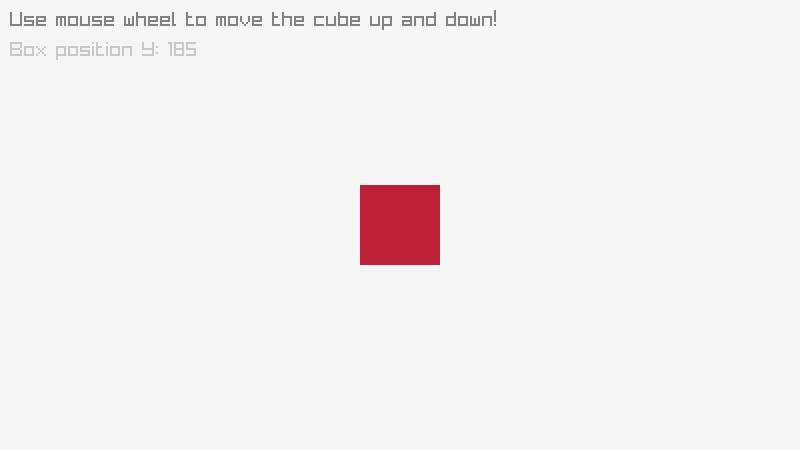
Code
core_input_mouse_wheel.odin ¶63 linesSource
1/*******************************************************************************************
2*
3*   raylib [core] example - input mouse wheel
4*
5*   Example complexity rating: [★☆☆☆] 1/4
6*
7*   Example originally created with raylib 1.1, last time updated with raylib 1.3
8*
9*   Example licensed under an unmodified zlib/libpng license, which is an OSI-certified,
10*   BSD-like license that allows static linking with closed source software
11*
12*   Copyright (c) 2014-2025 Ramon Santamaria (@raysan5)
13*
14********************************************************************************************/
15
16package raylib_examples
17
18import rl "vendor:raylib"
19
20//------------------------------------------------------------------------------------
21// Program main entry point
22//------------------------------------------------------------------------------------
23main :: proc() {
24	// Initialization
25	//--------------------------------------------------------------------------------------
26	SCREEN_WIDTH :: 800
27	SCREEN_HEIGHT :: 450
28
29	rl.InitWindow(SCREEN_WIDTH, SCREEN_HEIGHT, "raylib [core] example - input mouse wheel")
30
31	box_position_y: int = SCREEN_HEIGHT/2 - 40
32	scroll_speed: int = 4            // Scrolling speed in pixels
33
34	rl.SetTargetFPS(60)               // Set our game to run at 60 frames-per-second
35	//--------------------------------------------------------------------------------------
36
37	// Main game loop
38	for !rl.WindowShouldClose() {    // Detect window close button or ESC key
39		// Update
40		//----------------------------------------------------------------------------------
41		box_position_y -= int(rl.GetMouseWheelMove()*f32(scroll_speed))
42		//----------------------------------------------------------------------------------
43
44		// Draw
45		//----------------------------------------------------------------------------------
46		rl.BeginDrawing()
47
48			rl.ClearBackground(rl.RAYWHITE)
49
50			rl.DrawRectangle(SCREEN_WIDTH/2 - 40, i32(box_position_y), 80, 80, rl.MAROON)
51
52			rl.DrawText("Use mouse wheel to move the cube up and down!", 10, 10, 20, rl.GRAY)
53			rl.DrawText(rl.TextFormat("Box position Y: %03i", box_position_y), 10, 40, 20, rl.LIGHTGRAY)
54
55		rl.EndDrawing()
56		//----------------------------------------------------------------------------------
57	}
58
59	// De-Initialization
60	//--------------------------------------------------------------------------------------
61	rl.CloseWindow()        // Close window and OpenGL context
62	//--------------------------------------------------------------------------------------
63}